NETFLIX
HANNAH SAEEDI


Project Brief
Every day, more and more people turn to streaming services. I was interested in learning about Netflix's inadequacies, particularly in terms of functionality and usability. I attempted to identify users' pain points when using the Netflix application on TV and utilize that information to add three features in order to enhance the overall experience.
Role
Group Leader, UX/UI Designer,
UX Researcher & Visual Designer
Team
Group of 3
Timeline
10th January - 14th March (8 weeks)
Tools
Adobe XD, Miro, Jira, Adobe Photoshop, Canva

THE PROCESS
PHASE 1: RESEARCH
PHASE 2: DESIGN

Define

Define
-
Competitor Analysis between Disney Plus, Amazon Prime Video and Netflix
-
Interviews: Conducted interviews with 6 participants
-
Created Affinity Mapping and User Persona to recognize the pain points

Ideate

Prototype

Test
-
Created Journey Map for three new features
-
Sketched Paper Wireframes and Wire Flows
-
Made Low-Fidelity wireframes of all three new features
-
Used Low-Fidelity prototypes to conduct Usability Testing
-
Finalized High-Fidelity prototypes
Methods
To gain an empathetic awareness of current attitudes, pain points, and behaviours connected with the Netflix TV application. In this project, I used secondary and primary research approaches such as competitor analysis, user interviews and usability testing.
Key Findings
From user interviews, I discovered that despite being one of the most popular streaming applications in the world, Netflix has much potential for improvement.
-
The user could not find ratings on the Movie’s Information Page
-
Users could not find appropriate content fast; this process would be time-consuming, and sometimes they were tired and gave up watching Netflix
-
Users could not find reviews and rates on Netflix; they were forced to go to IMDb or other websites to see/select movies based on rates
-
The current Netflix app does not have any Review Page to write reviews
-
Users can not share their cherished content with friends
-
Users can not rate films or TV shows on Netflix
Solutions
Based on the study's research findings, I decided to add three features to the Netflix TV application:
-
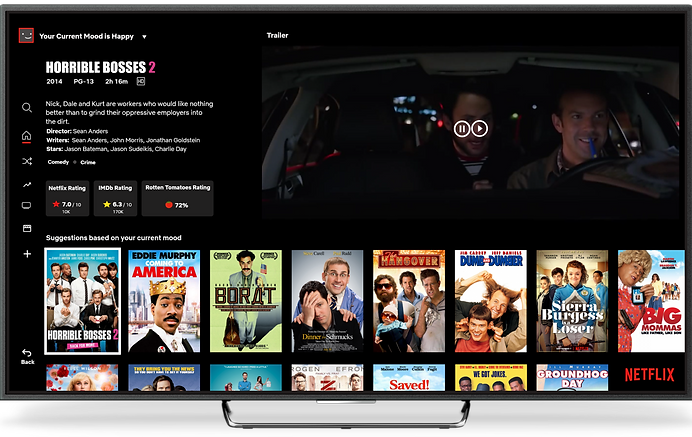
The "Mood Identifier" feature suggests specific categories for the user's mood. This feature is to have Netflix recommend movies/shows by understanding the user's mood, like comedies for dull and depressed moods, romantic dramas for love, etc.
-
The "Rating & Sharing" feature eliminates the inconvenience for users to switch screens to a third-party website to check the reviews. Also, they can see Netflix, IMDB and Rotten Tomatoes ratings on the movie information page.
-
"Writing Review" feature for users to write their reviews under their desired movies or TV series. Also, they can read/see other users' reviews and rates.
Methods

Competitor Analysis
What did Netflix miss?
Netflix's minor issue and major strength signify how they ultimately remain the number one streaming service worldwide. However, they must take advantage of their opportunities based on user needs and avoid the threats to maintain this title by:
-
Finding content based on rating reviews
-
Finding appropriate content based on the user's mood
-
Sharing content and writing review

Interview & Usability Testing
What is the user's perception of the app?
-
The app is designed to entertain people with “Ad-free” content
-
Users could have “Multiple Viewership Subscriptions,” which could benefit family members
-
Users could download their desired “Offline Playback” content in their travels and where they could not access WIFI
-
Netflix app provides a “High-Quality Library” in various genres.
What are their needs and goals?
-
Needs to find ratings on the movie's information page
-
Wants to compare ratings on Netflix
-
Needs to find appropriate content
-
Needs to select films based on review rates
-
Wants to see and write a review on Netflix
-
Wants to share cherished content with friends
-
Needs to rate movies or TV shows on Netflix
What are the users trying to achieve?
-
Eliminate the inconvenience for users to switch screens to go to a third-party website to find review rates.
-
Provide a Netflix rating feature like the IMDb website in the app
-
Use the share option to share users' beloved content with their friends.
-
Use the written review feature for the user's convenience.
-
Add a mood Identifier feature on the Movie's page to allow the user to select different moods.
-
Adding specific categories suggestions based on the user's current mood


User Persona
Journey Map

Low-Fidelity Prototype

Task Flow before Usability Testing

Low-Fidelity Usability Testing
Key Findings of Usability Testing
-
Participants expected to see a trailer of the content when they selected it as opposed to just the movie poster.
-
The mood tab at the top of the Homepage should be a dropdown menu
-
There should be a back button and a skip forward button if the user does not wish to enter their mood. This highlights the "user control and freedom" heuristic because there is the need for an "emergency exit."
-
There can be illustrated moods on the mood page
-
There should be an option for the user to write a review
-
There should be a share button in the details of the content to share the link with friends
Solutions
-
Add a trailer on the Homepage when content is selected instead of the movie poster
-
Add a dropdown menu for the mood options
-
Add a back button and skip button to the mood page
-
Add an option for users to write a review
-
Add a share button in the content details
Usability Testing Issues

1) Add a trailer on the Homepage when content is selected instead of the movie poster
2) Add a dropdown menu for the mood options on the Homepage to save the user from switching pages
3) Add a back button and skip button to the mood page
4) Add an arrow to indicate a dropdown menu and increase the font size
5) Add an option for users to write a written review. It would be better to have a write-review option in the Netflix app.
6) Add reviews from other regions
7) Add written descriptions of each rating system
8) Add a share button in the content details
Final Task Flow

Final Flow

THREE NEW FEATURES
01. MOOD IDENTIFIER
When users open the app on TV or mobile, there is a window to ask, "What mood are you in right now?" The answer would suggest movies, TV shows or documentaries to the user.
This feature is to have Netflix recommend movies/shows by understanding the user's mood.
Play the video to see the demo!
02. RATING & SHARING
Users could rate the movie after the last scene. They could rate between one to five stars. Also, if users liked the film, they could share it with their friends via Facebook, Twitter or Email.
Play the video to see the demo!
03. WRITING REVIEW
Research from our interviews told us that users were interested in writing reviews on Netflix.
This solution gives the user two options:
After watching a movie, they can add their review via their Facebook, Twitter or Email accounts. Also, they can read others' reviews.
Play the video to see the demo!
HIGH-FIDELITY PROTOTYPE


High-Fidelity Prototype Link:
ABOUT THE PROJECT
PROJECT DURATION
8 Weeks
GROUP MEMBERS
3 Students
WHAT DID I LEARN DURING THIS PROJECT?
-
Group collaboration
-
How to lead my team through the design process
-
How to manage different time zones for our online meetings
-
How to deal with different cultures
-
How to work with each other with different personality types
-
How to record and use voice-over on prototype videos
-
How to edit videos for High-Fidelity prototype
Thanks for visiting! Let's keep in touch!


